If a guide doesn't answer your question, our team can help. Requests come straight to real people at Steadyfaith.
Send a request
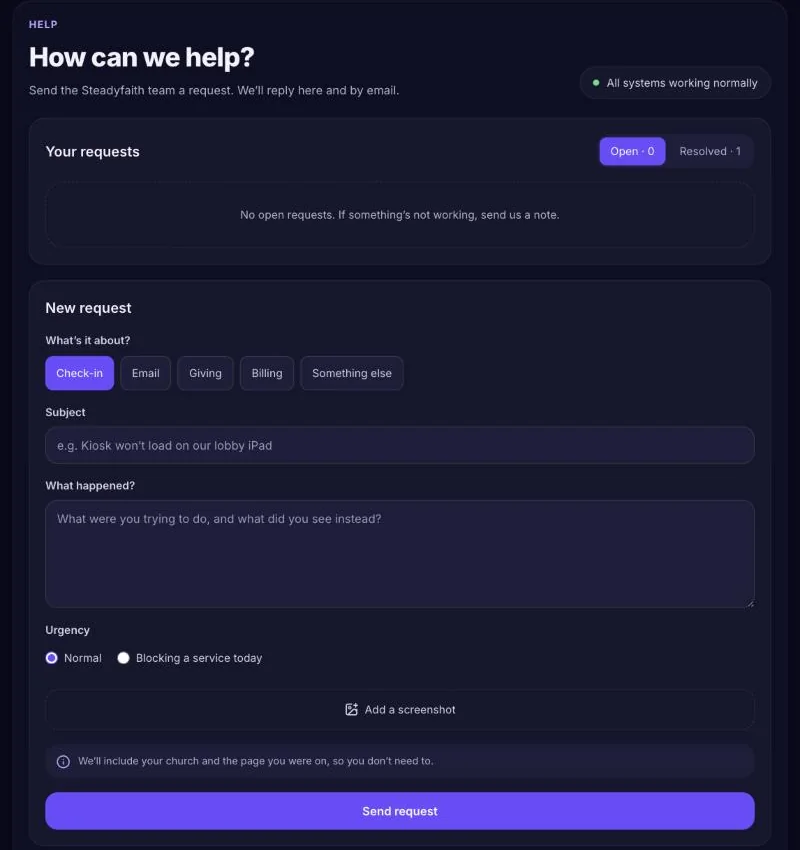
- Open Help & support — Choose Help & support in the dashboard menu.
- Pick what it's about — Check-in, Email, Giving, Billing, or Something else.
- Tell us what's happening — Say what you expected and what you saw instead. Use Add a screenshot — it helps a lot (under 4 MB). Your church and the page you were on are included for you.
- Set the urgency — Choose Blocking a service today only if it's stopping your church right now.
- Send request — We'll reply on the request and by email.
Follow up
Your requests are listed on the Help page:
- Open — we're on it.
- Waiting on you — we've replied and need something from you.
- Resolved — sorted. Reply if it comes back and we'll pick it up again.
If something affects every church — planned maintenance, or a problem we're fixing — you'll see a notice at the top of the Help page.
Can't sign in?
Email support@steadyfaith.io from the address you use for Steadyfaith, and tell us your church's name.